Categorical Plot Functions
ClinicoPath Development Team
2026-08-14
Source:vignettes/legacy/08-categorical-plots-legacy.Rmd
08-categorical-plots-legacy.RmdThis vignette demonstrates the functions designed for categorical
data: jjbarstats(), jjpiestats() and
jjdotplotstats().
Bar charts with jjbarstats()
jjbarstats() creates a bar chart and automatically
performs a chi-squared test to compare the distribution of two
categorical variables. The example below compares the number of
cylinders (cyl) across transmission types
(am).
jjbarstats(data = mtcars, dep = cyl, group = am, grvar = NULL)
#>
#>  BAR CHARTS
#> WARNING: Low Expected Counts
#> Variable 'cyl' vs 'am': chi-square expected-count assumption violated (some cells < 5). Results may be unreliable.
#>  <div style='padding: 15px; background-color: #f8f9fa; border-left: 4px
#>  solid #007bff; margin: 10px 0;'><h4 style='color: #007bff; margin-top:
#>  0;'> About Bar Chart Analysis
#>
#>  Purpose: Compare the distribution of categorical variables across
#>  groups using statistical testing.
#>
#>  When to Use:
#>
#>  Diagnostic Tests: Compare test results (positive/negative) across
#>  patient groupsTreatment Response: Analyze response rates across
#>  different treatmentsBiomarker Expression: Compare expression levels
#>  (low/medium/high) by clinical factorsRisk Factor Analysis: Examine how
#>  risk factors relate to outcomes
#>
#>  Output Includes:
#>
#>  Visual bar chart with statistical annotationsChi-square or appropriate
#>  statistical test resultsEffect size measures and confidence
#>  intervalsPost-hoc pairwise comparisons (when >2 groups)
#>
#>  <div style='padding: 15px; background-color: #e8f5e8; border-left: 4px
#>  solid #28a745; margin: 10px 0;'><h4 style='color: #28a745; margin-top:
#>  0;'> Analysis Summary
#>
#>  Variables Analyzed: cyl by am
#>
#>  Sample Size: 32 observations across 2 groups
#>
#>  Statistical Method: Chi-square test of independence
#>
#>  Confidence Level: 95%
#>
#>  <div style='padding: 15px; background-color: #fff3cd; border-left: 4px
#>  solid #ffc107; margin: 10px 0;'><h4 style='color: #856404; margin-top:
#>  0;'> Statistical Assumptions & Warnings
#>
#>  General Assumptions:
#>
#>  Variables are categorical or ordinalObservations are
#>  independentExpected cell counts ≥ 5 for chi-square validity
#>
#>  Detected Issues:
#>
#>  Chi-square Assumption Violated (cyl): 3 of 6 cells (50%) have expected
#>  counts < 5.
#>
#>  Recommendations:
#>
#>  Recommendation: Consider combining categories or using non-parametric
#>  methods. Fisher's exact test is only available for 2×2 tables.
#>
#>  Bar chart analysis comparing cyl by am.
#>
#>  Data prepared: 32 observations (missing values will be handled by
#>  statistical functions) (cached).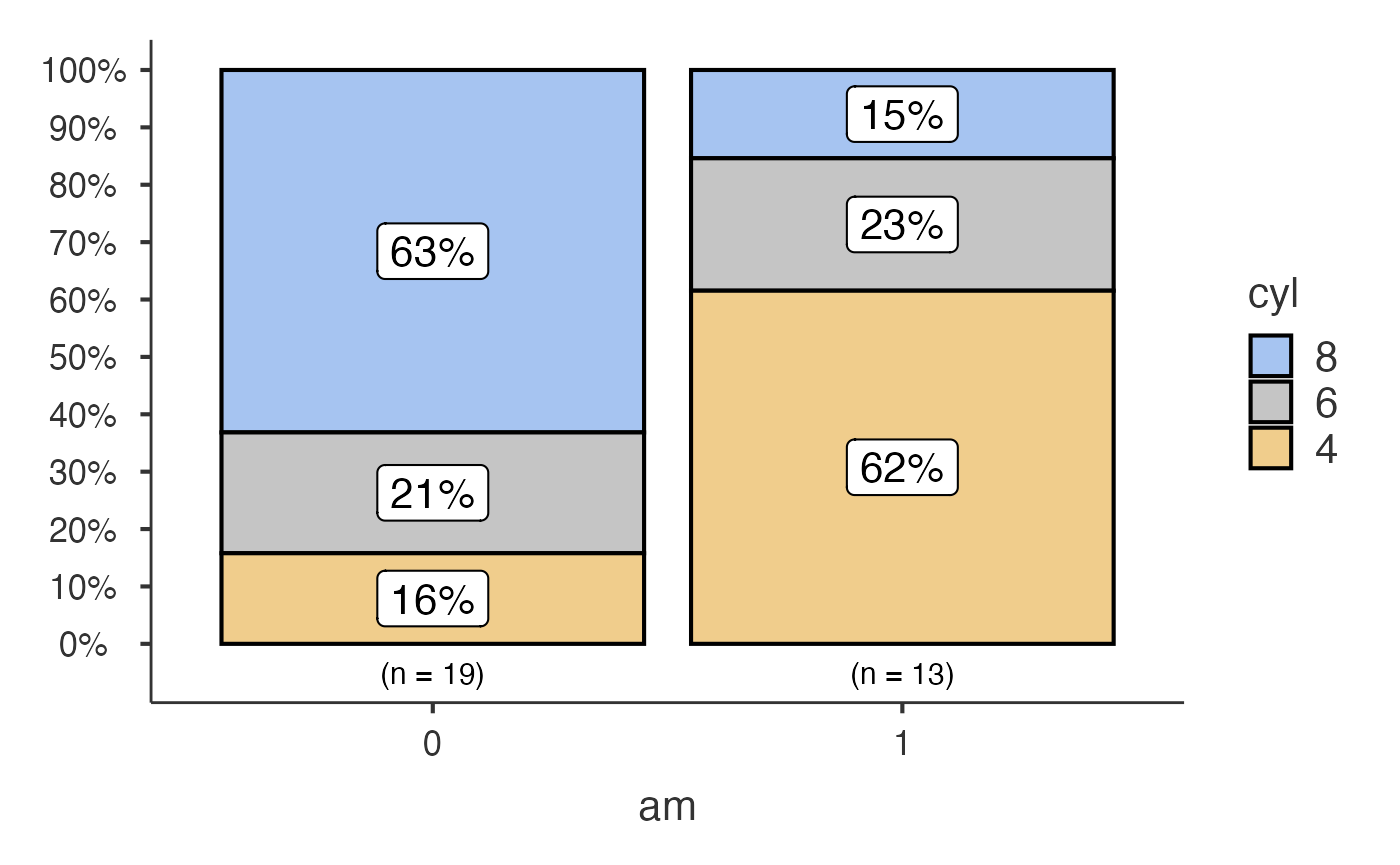
Pie charts with jjpiestats()
jjpiestats() is similar to jjbarstats() but
displays the results as a pie chart.
jjpiestats(data = mtcars, dep = cyl, group = am, grvar = NULL)
#>
#>  PIE CHARTS
#>
#>  Pie Chart Analysis
#>
#>  What this analysis does: Generates pie charts with statistical
#>  analysis to compare categorical variables across groups. Performs
#>  chi-square tests, Fisher's exact tests, or other appropriate
#>  statistical tests based on your data.
#>
#>  When to use: Use when you want to visualize proportions of categorical
#>  outcomes and test for significant differences between groups. Ideal
#>  for diagnostic test results, treatment responses, or biomarker
#>  categories.
#>
#>  Current configuration: This analysis uses custom settings for pie
#>  chart generation with statistical testing.
#>
#>  What you'll get: Interactive pie charts with statistical test results,
#>  confidence intervals, and effect sizes. Optional grouped analysis for
#>  complex study designs.
#>
#>  Copy-Ready Report Template
#>
#>  <div style='background-color: #f8f9fa; padding: 15px; border: 1px
#>  solid #dee2e6; border-radius: 5px;'>
#>
#>  Methods:
#>
#>  We compared cyl distributions across am using Pearson's chi-squared
#>  test. Statistical significance was set at p < 0.05. All analyses were
#>  performed using jamovi statistical software.
#>
#>  Results:
#>
#>  [Results will be automatically filled when analysis is complete]
#>
#>  Copy the text above and modify as needed for your manuscript or
#>  report.
#>
#>  Pie chart analysis ready Variable: cyl, grouped by am.
#>
#>  Data prepared: 32 observations (cached).
#>
#>  Statistical method: Parametric analysis.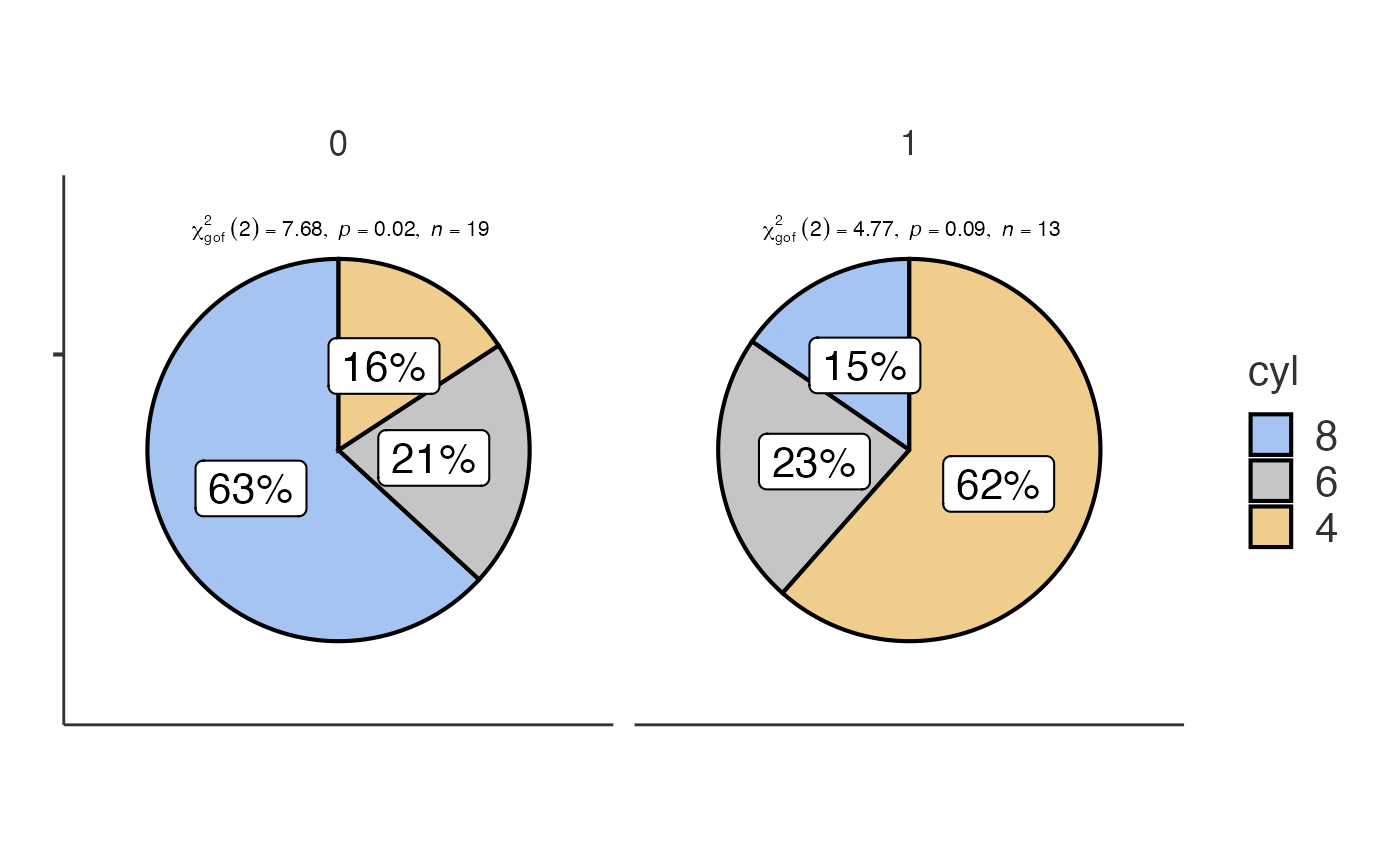
Dot charts with jjdotplotstats()
jjdotplotstats() shows group means using a dot plot. In
this example we plot horsepower (hp) by engine
configuration (vs).
jjdotplotstats(data = mtcars, dep = hp, group = vs, grvar = NULL)
#>
#>  HORIZONTAL BOX-VIOLIN COMPARISON
#>
#>  Processing data for dot plot analysis...
#>
#>  1 potential outlier(s) detected in hp
#>
#>  Analysis summary: 2 groups, 32 total observations
#>
#>  <div style='background-color: #cce5ff; border-left: 4px solid #b8daff;
#>  padding: 12px; margin: 8px 0; color: #004085;'> INFO: Comparing 2
#>  groups with N = 32 observations using a parametric (t-test/ANOVA)
#>  test.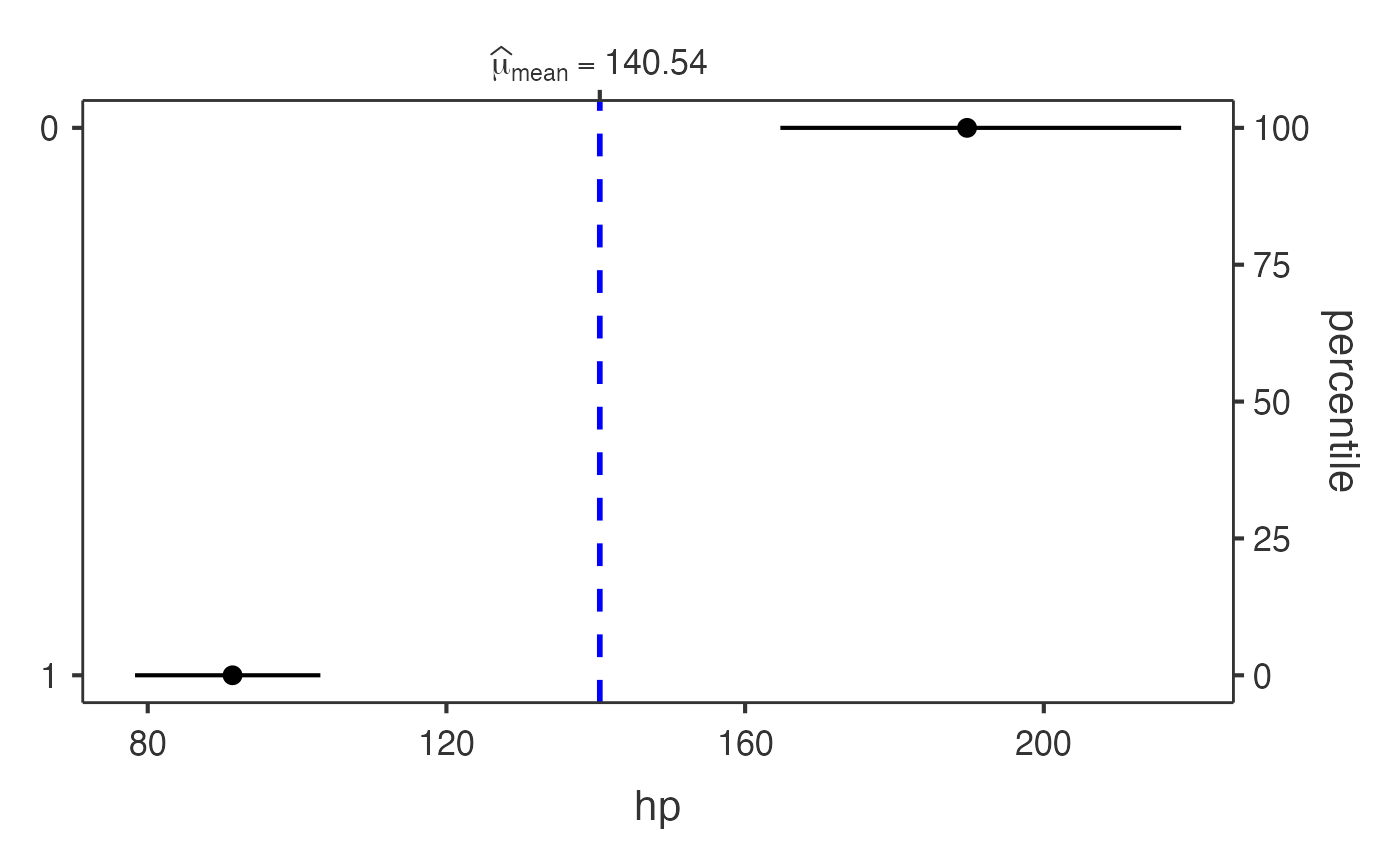
Each function returns a results object whose plot
element contains the ggplot2 visualisation.